


The hob with the  Switch on the button, then select the desired hob
  and set the level using the +/- buttons. To switch the cooker off completely, press the press.
Setting the fan speed
Press the  to increase the fan speed.
Press the  to reduce the fan speed.
Observe residual heat display
After switching off, the cooking zone is still hot. H is shown in the cooking zone display (residual heat display). After sufficient cooling time (temperature < 60 °C), the cooking zone display also goes out
Switch on the childproof lock
Prerequisite: All cooking zones are switched off.
Within 10 seconds of switching on, simultaneously press the  Sensor button and the minus button
  and then press the sensor button again .
If is displayed on all cooking zone displays, the childproof lock is activated.
Switch off the childproof lock
Press the sensor button at the same time and the minus button and then press the minus button again .
All cooking zone displays show power level 0, which means that the childproof lock is switched off.



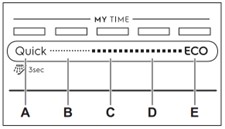
A Quick is the shortest programme (30 minutes), which is suitable for washing a load with fresh and light soiling.
 Prewash (15 min.) is a programme for rinsing food residues from dishes. It prevents the formation of odours in the appliance. Do not use detergent in this programme.B 1h is a programme that is suitable for washing a load of fresh, slightly dried food.
C 1 hr. 30 min. is a programme suitable for washing and drying normally soiled dishes.
D 2 hrs. 40 min. is a programme suitable for washing and drying heavily soiled dishes.
E ECO is the longest programme with the most efficient use of energy and water for normally soiled crockery and cutlery.
 AUTO Sense
The AUTO Sense programme automatically adjusts the wash cycle to the load. The appliance recognises the degree of soiling and the amount of dishes in the baskets. It automatically adjusts the temperature and amount of water as well as the wash time.
EXTRAS
By activating EXTRAS, you can adapt the programme selection to your needs.
 ExtraPower improves the wash result of the selected programme. This option increases the wash temperature and duration.
 GlassCare prevents delicate wash ware, especially glassware, from being damaged.